

Server Discovery and Browsing
If players can’t find servers or friends they won’t play your game nearly as much as they want to. Server discovery is the bridge between your game’s multiplayer and the people who want to use it. How you handle this directly affects your multiplayer player retention, re-engagement, and revenue share from hosting.
Why Discovery Matters
Section titled “Why Discovery Matters”A game with great multiplayer but poor server discovery will have low fill rates, low retention, and frustrated players. The easier it is for a player to find a server that matches what they want (right region, right mode, friends playing), the more likely they are to keep playing.
Common discovery models, roughly ordered from least friction to most:
- Matchmaking / Social Join: Player clicks one button, gets placed in a server. Lowest friction, least control for the player.
- In-game server browser: Player browses a list of servers with filters (map, player count, ping, mods). More control, more friction.
- Direct connect: Player enters an IP address and port. Maximum control, highest friction. Essential as a fallback but terrible as the primary method.
- Share codes / invite links: Player shares a code or URL that connects directly to their server. Good for private servers, not ideal as the only option.
Most games should support multiple models. A server browser for discovery, direct connect for power users and debugging, and invite links for private servers with friends.
Matchmaking / Social Join
Section titled “Matchmaking / Social Join”Providing Matchmaking for UGC focused games is not as direct or simple as it is more ephemeral/arcade style multiplayer titles. What type of gameplay, mods, and even player niche that someone is joining for heavily depends on the user.
Our take: Combine a Server Browser with player-specific recommendations so you are giving players the type of gameplay they like, with their social friend graph, and in their region. We built the Nodecraft Studio SDK to solve this as an easy integration.
Server Browser
Section titled “Server Browser”A well-built server browser helps players find relevant UGC game servers to connect to, while also balancing the needs of larger game server communities to market and engage with potential players.
Examples:
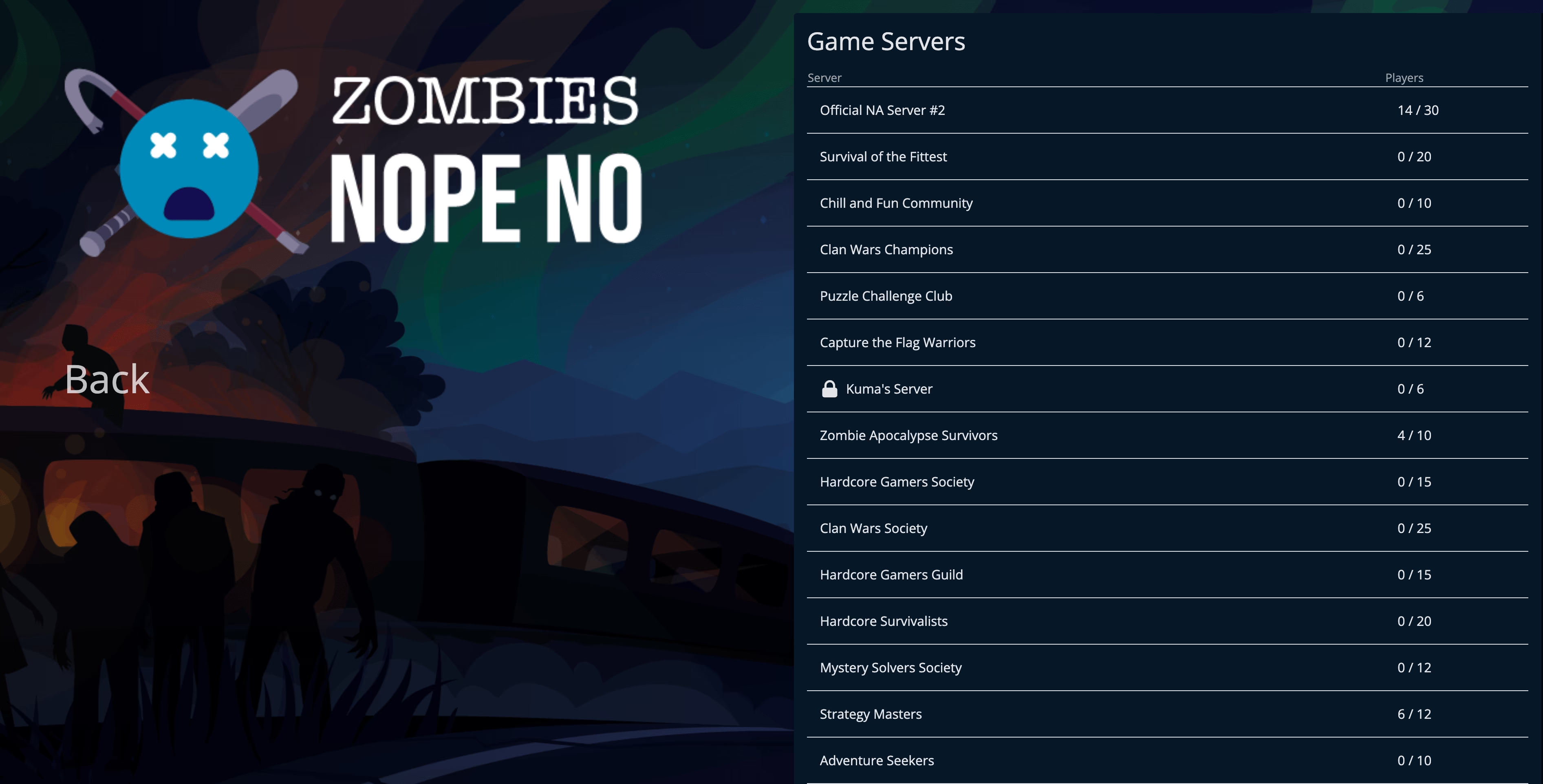 Simple Server Browser
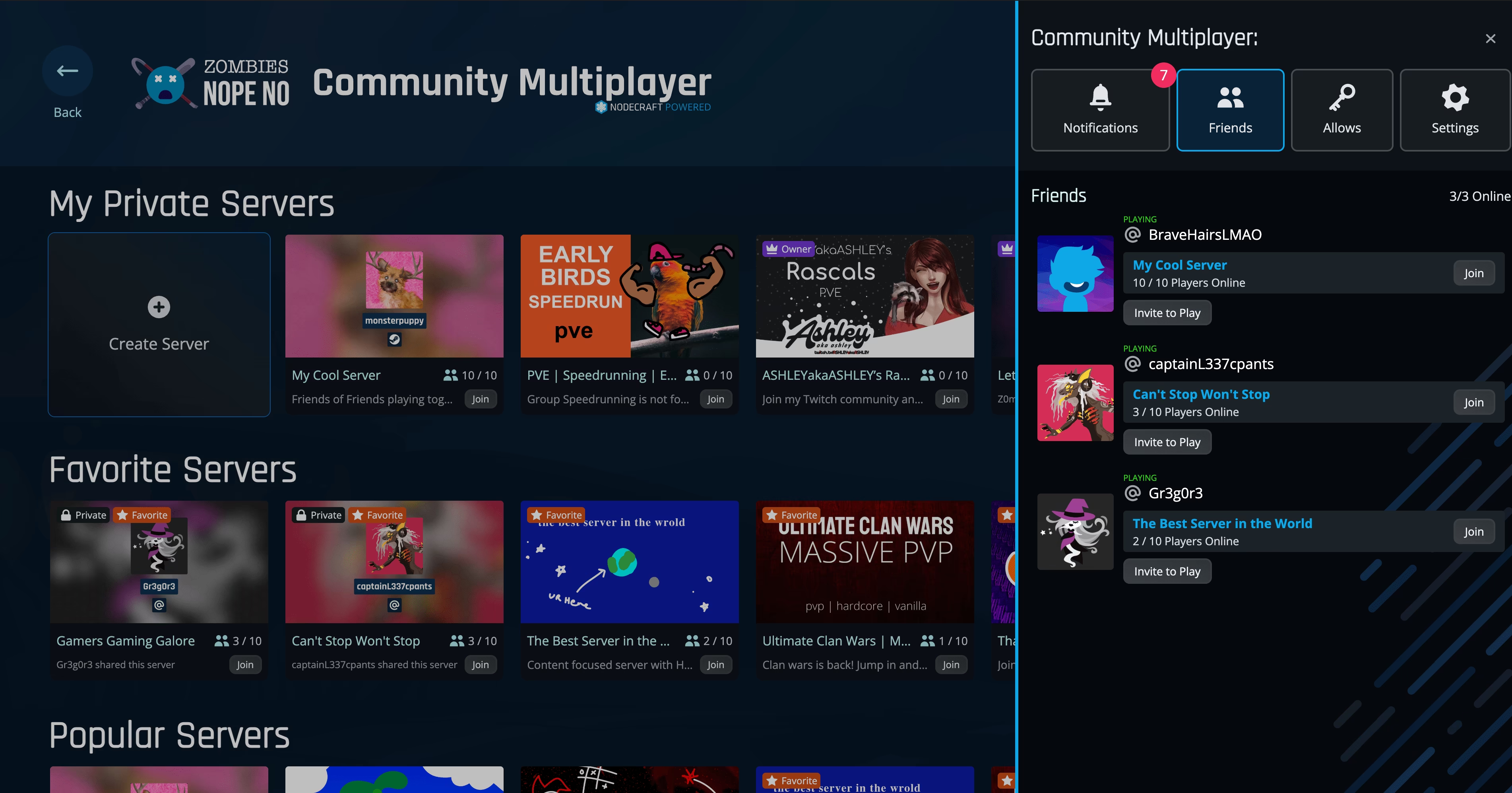 Full-Featured Server Browser
If you compare the two examples above, the Simple Server Browser is easier to implement and has less features, but ultimately lacks the essential features to deeply engage users. Our recommendation is to make sure your server browser:
- Gives Servers a unique identity that includes a name, icon/banner, & searchable tags
- Shows what servers friends are playing on
- Provides filters and sorting options to help players find the right server
- Gives players recommendations based on their play history and social graph
- Allows them to create servers directly in-game
Direct Connection Methods
Section titled “Direct Connection Methods”Many games forego or also include direct connection methods. This is where players can enter an IP address and port to connect directly to a server without going through a server browser or matchmaking system. It’s a critical fallback for players who want to connect to a specific server, especially in the early days of a game’s launch when the server population is low. This is also the debugging lifeline for Hosting Providers, server admins, and your own QA team.
Your game client needs:
- A UI field where the player can enter a server address (IP or domain) and port
- Support for non-default ports (do not strip or ignore the port number)
- A way to bookmark/save direct connect addresses
We recommend always requiring the user to set a port, even if it’s the default. This forces players to be aware of ports and ensures they can connect to servers on non-standard ports, which is the default in shared hosting environments.
Direct Connect using DNS
Section titled “Direct Connect using DNS”Allowing players to connect using a domain name (e.g., play.mygame.com) instead of an IP address can make it easier for them to remember and share server addresses. This is especially useful for private servers or communities that want a branded address. More importantly game server hosting providers often use dynamic IPs, so providing a DNS name that points to the server’s current IP address is essential for reliable connectivity.
Adding basic DNS lookup is straightforward and can be done using standard libraries in your game server’s programming language. We HIGHLY recommend supporting DNS SRV records for your game servers. This allows hosting providers to run multiple servers on the same IP address with different ports, while players can connect using the same domain name without worrying about port numbers.
Share Codes and Invite Links
Section titled “Share Codes and Invite Links”Share codes (short alphanumeric strings that map to a server) and invite links (URLs that launch the game and connect to a server) reduce friction for private servers.
They work well for:
- Private servers shared among friends
- Events and tournaments
- Content creator communities
They are not a substitute for a server browser or matchmaking. If the only way for a stranger to find your game’s servers is to have a code from someone who already plays, your multiplayer discoverability is broken. Ultimately share codes function the same as a DNS hostname, but require your own backend to map codes to server addresses. This can be a simple key-value store that maps a code to an IP address and port, with an expiration time.
We do not commonly recommend this approach as it adds complexity and friction for players, but it can be a nice addition for private servers when your restricted by dev time or resources.
See the Server Discovery API docs for implementation details.
Regions and Distance
Section titled “Regions and Distance”Players care about latency. A server browser that shows servers sorted by player count or name forces players to guess which server will give them a good connection.
If you implement your own server browser, include region or ping information. At minimum, display the server’s region (US East, EU West, etc.) so players can make informed choices.
Nodecraft Studio’s Server Regions feature calculates a distance score (0-5) between each player and each server, making it easy to sort by geographic proximity.
Nodecraft Studio’s Discovery System
Section titled “Nodecraft Studio’s Discovery System”Nodecraft Studio provides a complete server discovery platform including:
- Personal server lists for allow-based servers visible to invited players
- Community server discovery with tags, descriptions, and moderation
- Player recommendations based on play history and friend activity
- Region-based distance scoring that surfaces nearby servers first
- Favorites for tracking servers across sessions